Fixed positioning not working!

Hi Guys,
Please find a link below:
http://www.jcbarlow.com/portfolio-portraits.htm
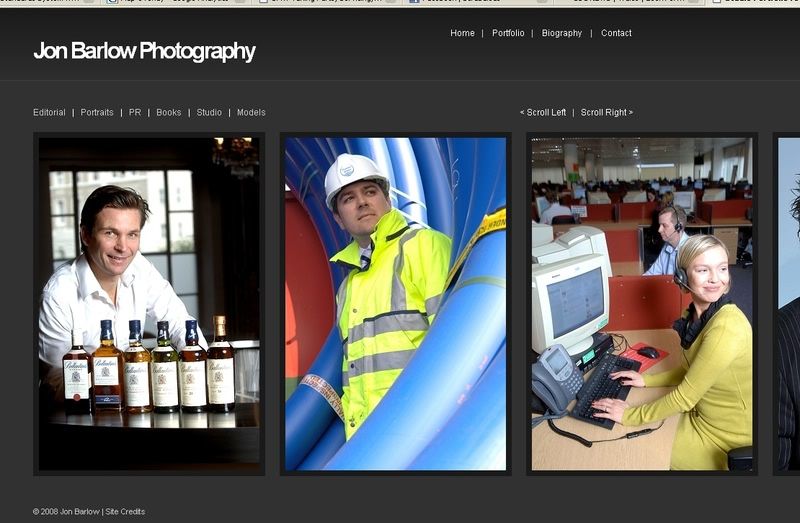
On my screen, the website looks like this:
http://i2.photobucket.com/albums/y50/robfenn/screengrab.jpg
As you can see, my screen is fairly big. When resizing it down to 1024x768 it starts to go wrong, especially when using the IE6 opposed to Firefox or even IE7.
Can anyone offer any help with keeping the elements in the right place? Looking at my site stats over 40% use 1024x768 so it would be pointless having the site if it doesn't suit them those users...
Cheers
Rob

caffinephil posted this at 09:51 — 15th April 2008.
They have: 99 posts
Joined: Feb 2008
What effect are you trying to achieve?
robfenn posted this at 09:57 — 15th April 2008.
He has: 471 posts
Joined: Jun 2005
Basically the client liked the effect of scrolling horizontally to see all of his photos. He showed me a competitor who did it, but using frames!
Essentially i just wanted to have it scrolling but for the menu to always be visible, for usability.
In essence, i want it look like it is in the screenshot for all browsers, and at at least 1024x768 - which it currently doesn't.
Cheers
Rob
webwiz posted this at 05:11 — 16th April 2008.
He has: 629 posts
Joined: May 2007
Rob - Fixed positioning does not work in IE versions 6 and below. You may like to read CSS - An 'Absolute' Mess for more on this.
BTW - the page took over 13 minutes to load here (on dial-up). You may like to re-think the idea of adding more than 2.5 MB of images to a single web page. I also suggest adding the 'Scroll left' and 'Scroll right' links with JavaScript, as they are useless when scripting is turned off or not available.
Cordially, David
--
delete from internet where user_agent="MSIE" and version < 8;
webwiz posted this at 18:11 — 17th April 2008.
He has: 629 posts
Joined: May 2007
Hello again Rob -
I just came across this article: Fake position:fixed for IE6. Hope it helps.
Want to join the discussion? Create an account or log in if you already have one. Joining is fast, free and painless! We’ll even whisk you back here when you’ve finished.